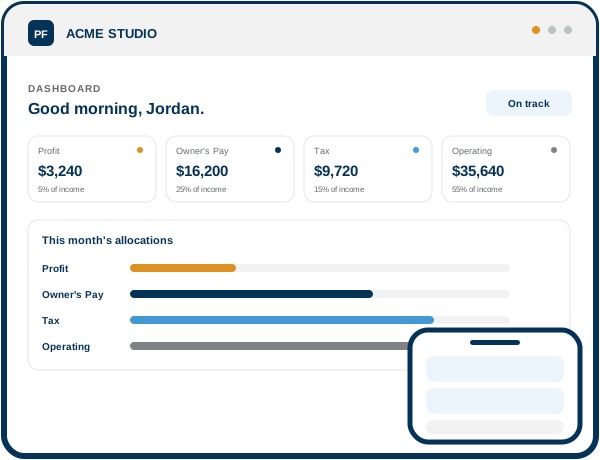
The Profit First App dashboard showing account balances and this month's allocations

Put Your Profit on Autopilot

The Profit First App turns Mike Michalowicz’s Profit First method into an app that splits every dollar of income the moment it lands — so you always know what’s safe to spend.

  • Built on the Profit First method
  • Direct account handoff
  • $1M

    Allocated by App users

  • 1.5k

    Businesses signed up

  • 89%

    Report less month-end stress

  • 4.8/5

    App Store & Play Store rating

Meet the author

The story behind Profit First

Mike Michalowicz

Creator of the Profit First method

Mike Michalowicz created the Profit First method and wrote the bestselling book by the same name, read by more than a million business owners. The Profit First App turns that system into an app that runs the allocations for you.

Try the allocation calculator

See where every dollar could go.

A visual planning tool for exploring an allocation rhythm. The percentages shown are placeholders, not financial advice.

Monthly revenue $50000
$5000 $200000

Example split

Your allocation preview

Profit

5% placeholder

$2500

Owner's Pay

25% placeholder

$12500

Tax

15% placeholder

$7500

Operating Expenses

55% placeholder

$27500

Illustrative only. Confirm recommended allocations and product logic before implementation.

What you get

Tools to help you achieve Profit First

Move between capabilities to see how the product story unfolds.

See Your Money Clearly
  • One view for every account
  • Clear allocation status
  • Less spreadsheet switching
The Profit First App dashboard showing account balances and this month's allocations
Allocate Profit First
  • Set your percentages
  • Preview each split
  • Keep profit visible
The Profit First App dashboard showing account balances and this month's allocations
Get Smart Guidance
  • Guided next steps
  • Helpful account prompts
  • A repeatable routine
The Profit First App dashboard showing account balances and this month's allocations
Reach Your Targets
  • Visible target ranges
  • Progress at a glance
  • Small changes over time
The Profit First App dashboard showing account balances and this month's allocations
How It Works

One method. Two ways to build the rhythm.

  • With a connected experience

    More guided
    1. Connect your accounts

    2. Set your percentages

    3. Income arrives

    4. Review the split

  • With your current bank

    More hands-on
    1. Connect your accounts

    2. Set your percentages

    3. Get paid on a rhythm

    4. Move funds with guidance

The quiet habits that make it stick

  • Separate accounts put temptation out of sight, not just out of mind.

  • Small, steady percentage increases beat one big, uncomfortable jump.

  • A fixed rhythm removes the guesswork of deciding when to allocate.

Questions

The doubts, answered here.

Placeholder answers are clearly marked where final product details still need approval.

Is the Profit First App operated by PFCA?

No. The Profit First App is built and operated by Profit First App, a separate company. PFCA is a referral partner.

Can I use my existing bank accounts?

This design reserves space for the confirmed answer from Profit First App before the page is published.

Do I need to know my allocation percentages already?

This design reserves space for approved guidance about getting started and setting target percentages.

What happens after I submit the form?

Your details are used to track the referral, then you continue directly with Profit First App to create your account.

Is this accounting software?

This design reserves space for approved product positioning and any accounting-platform distinctions.

Where can I read the Privacy Policy?
Get Started Free

Create your Profit First App account

Tell us a little about yourself and we’ll take you straight to the Profit First App to finish setting up your account.

The Profit First App is built and operated by Profit First App, a separate company — not Profit First Professionals Canada. Your account is created directly with them.